For owners comparing platforms

Golf Simulator Management Software Built to Grow Revenue First

Most management platforms ask you to migrate everything on day one. Perfect Swing Studio starts where the value is — repeat visits, memberships and member communication — and expands into full studio management on your timeline.

Begin alongside your existing booking and payment systems. Consolidate bays, bookings, memberships, billing, communications and analytics only when the case for it is obvious.

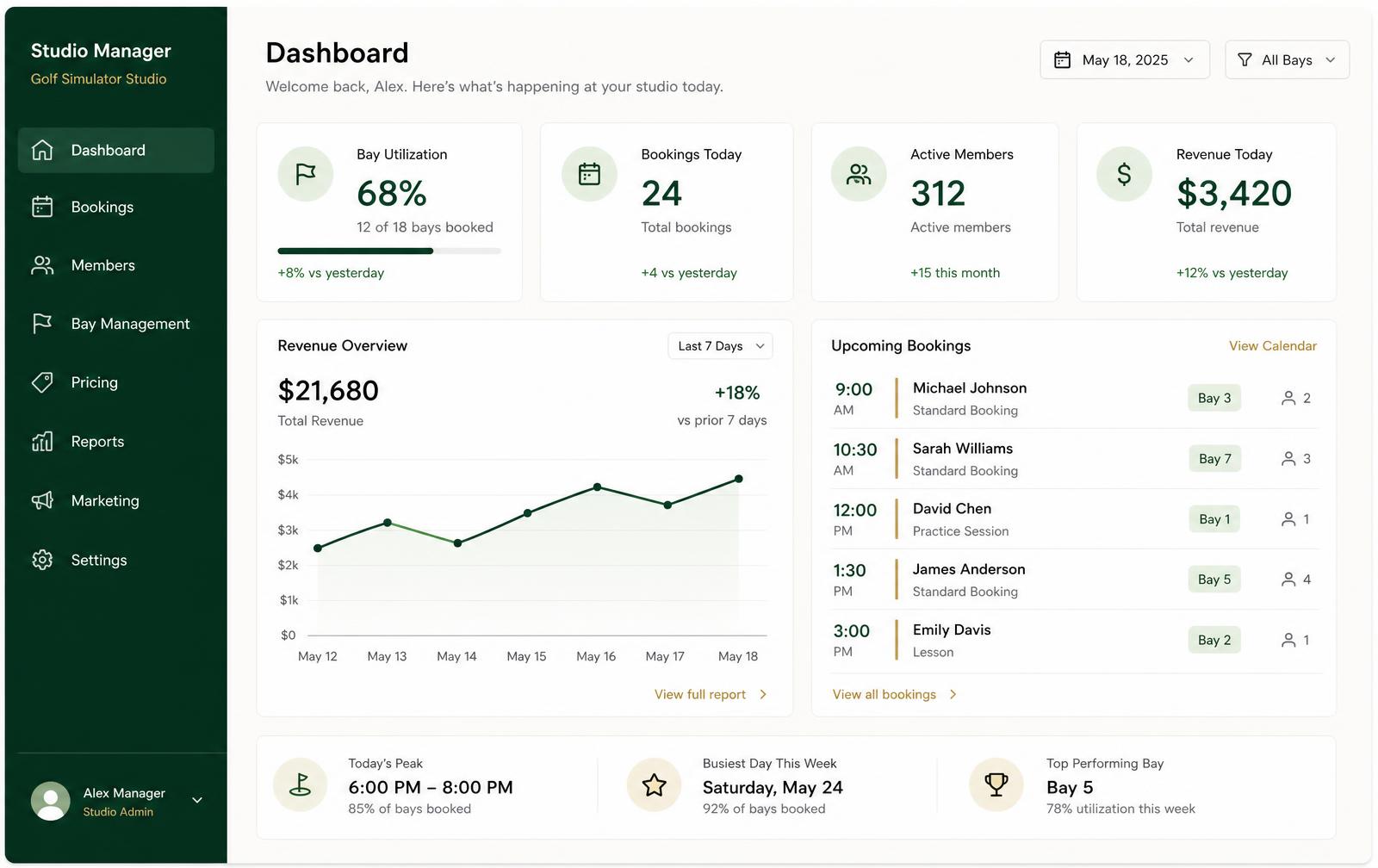
Studio dashboard
Golf simulator studio management dashboard showing bay utilisation, bookings today, active members, revenue trend and upcoming sessions.

What it does

A management platform you adopt in stages

Every stage stands on its own. Nothing you configure early has to be rebuilt when you take on more.

Stage 1 — Connect and see the business

Bring your member and visit information into one place while your current tools keep running. You get profiles, visit history and reporting without touching the front desk workflow your staff already know.

  • Member profiles with visit history, tier and notes
  • Utilisation and revenue reporting in one dashboard
  • No downtime, no cut-over weekend

Stage 2 — Engage the golfers you already have

Automated confirmations, reminders and follow-ups do the work a busy front desk cannot. This is usually where operators see the first measurable change in repeat visits.

  • Templates for confirmations, reminders and renewals
  • Follow-ups for lapsed members and first-time visitors
  • Communication history attached to the member record

Stage 3 — Consolidate operations

When you're ready, move scheduling onto the visual tee sheet, memberships and billing onto the member record, and retire the spreadsheets sitting between your tools.

  • Visual tee sheet across every bay and time slot
  • Booking records with status, party size and payment state
  • Membership tiers, credits, renewals and invoices

Stage 4 — Optimise with real evidence

Utilisation by bay and hour, revenue over time and retention curves give you the basis for pricing, opening hours, league scheduling and staffing decisions.

  • Utilisation heatmap by hour of day
  • Revenue trend and membership retention views
  • Reporting that reflects your actual bay inventory

Decisions backed by your own numbers

Indoor golf studios rarely lack opinions about which hours are weak — they lack the evidence. Utilisation, revenue and retention views put bay-level reality in front of you before you change pricing, add a league or extend hours.

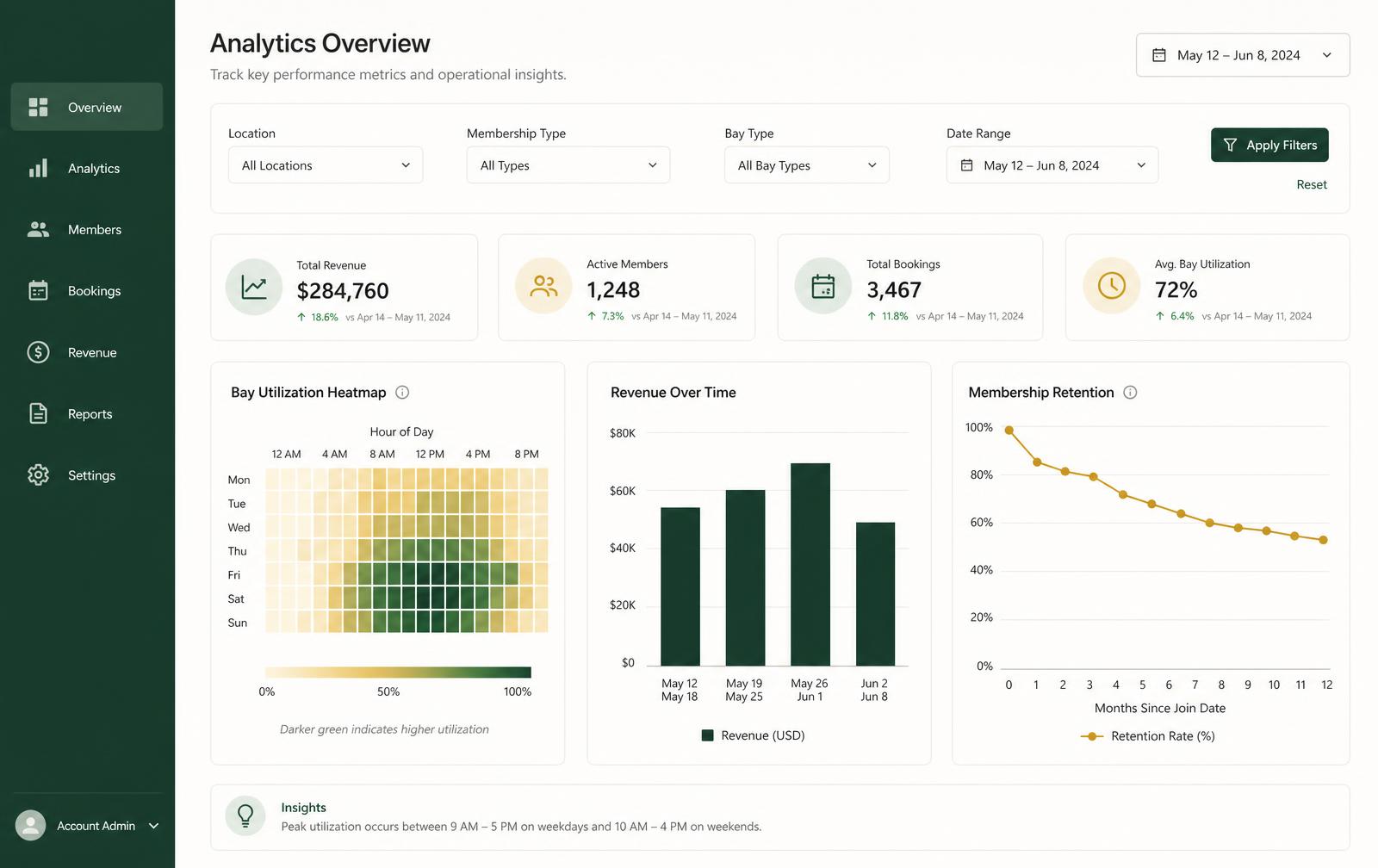
Analytics
Analytics overview for an indoor golf studio with a bay utilisation heatmap by hour, revenue bar chart and membership retention line chart.

Fit

Who this is built for

Perfect Swing Studio is built specifically for indoor golf simulator studios — venues whose inventory is bays and hours, and whose revenue depends on repeat visits and memberships rather than one-off transactions.

Owner-operators of 1–3 bay studios

You do the marketing, the scheduling and the month-end yourself. The value here is removing the manual follow-up and giving you utilisation evidence you currently guess at.

  • Automated confirmations, reminders and renewals
  • One member record instead of scattered notes
  • Bay-level utilisation without building a spreadsheet

3–6 bay studios with staff

Where disconnected tools start costing real money. Front desk, memberships and reporting need to agree on the same member and the same booking.

  • Visual tee sheet across every bay
  • Membership tiers, credits and renewals in one place
  • Reporting your staff don't have to assemble

League-heavy and multi-location operators

Recurring programming and shared memberships drive the requirements. We build for this, and we review your specific structure during the demo before confirming fit.

  • Recurring league and event blocks
  • Membership behaviour reviewed per operator
  • Per-site and consolidated reporting views

Not sure how to compare options? Our buyer's guide to choosing golf simulator management software gives you a scoring checklist and the questions to ask any vendor, including us.

What it replaces

The problems this actually removes

Not a feature list — the specific failures operators describe when they tell us why they started looking.

What breaks today

  • A generic calendar that doesn't understand bays or session length
  • Member details in one tool, membership credits in a spreadsheet
  • First-visit follow-up that only happens on quiet weeks
  • Renewals noticed after a payment fails, not before
  • Utilisation questions answered by memory rather than data
  • The same information typed into two systems every day

What replaces it

  • A tee sheet built around your real bay inventory and hours
  • One member profile carrying visits, tier, credits, invoices and messages
  • Automated lifecycle communication that runs on your busiest days
  • Renewal and expiry visibility before money is at risk
  • Utilisation by bay and hour, revenue trend and retention in one dashboard
  • A single place staff enter and read the same information

Connected workflows

Seven surfaces, one member record

The reason a connected platform beats good point tools is not any single screen — it's that a booking, a membership balance, an invoice and a message all reference the same golfer.

Visual tee sheet

Every bay and time slot in one view, with fast manual booking, moves and cancellations, plus recurring blocks for leagues, lessons and maintenance.

Booking management

Booking records carry status, party size, notes and payment state, so the front desk never has to check a second system to know where things stand.

Member management

Profiles with visit history, tier and staff notes — the context that turns a transaction into a relationship, and that survives staff turnover.

Memberships and billing

Tiers, included credits, renewals and invoices attached to the member record, with expiring memberships visible before they lapse.

Communications

Templated confirmations, reminders, renewal notices and win-back sequences, with send history on the member profile.

Analytics

Utilisation by bay and hour of day, revenue over time and membership retention — the evidence behind pricing and hours decisions.

Member portal

Members see upcoming sessions, membership balance and league nights on their phone, which removes routine questions from your front desk.

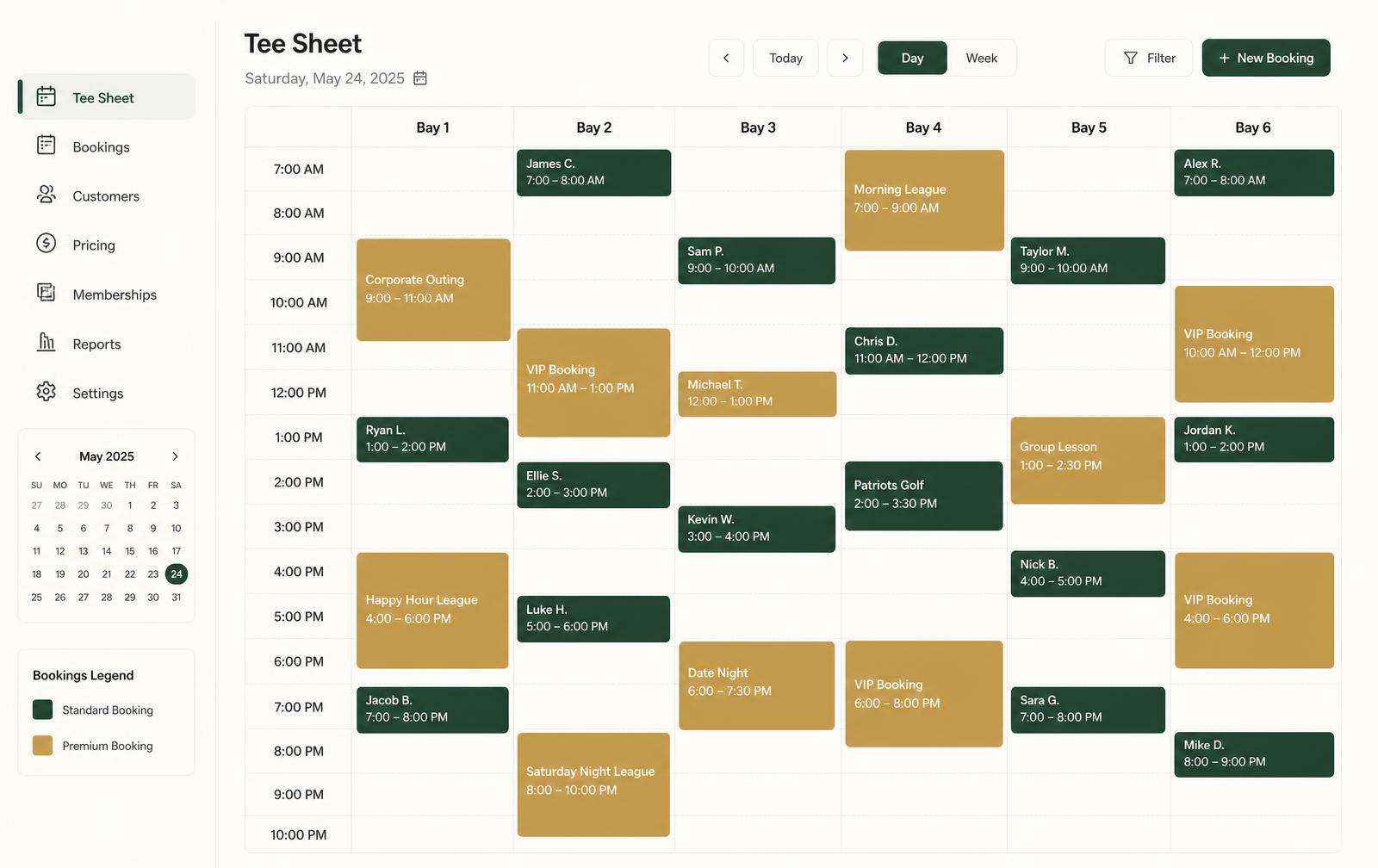
Visual tee sheet
Visual tee sheet for an indoor golf studio showing bookings across multiple simulator bays and time slots with status colours.
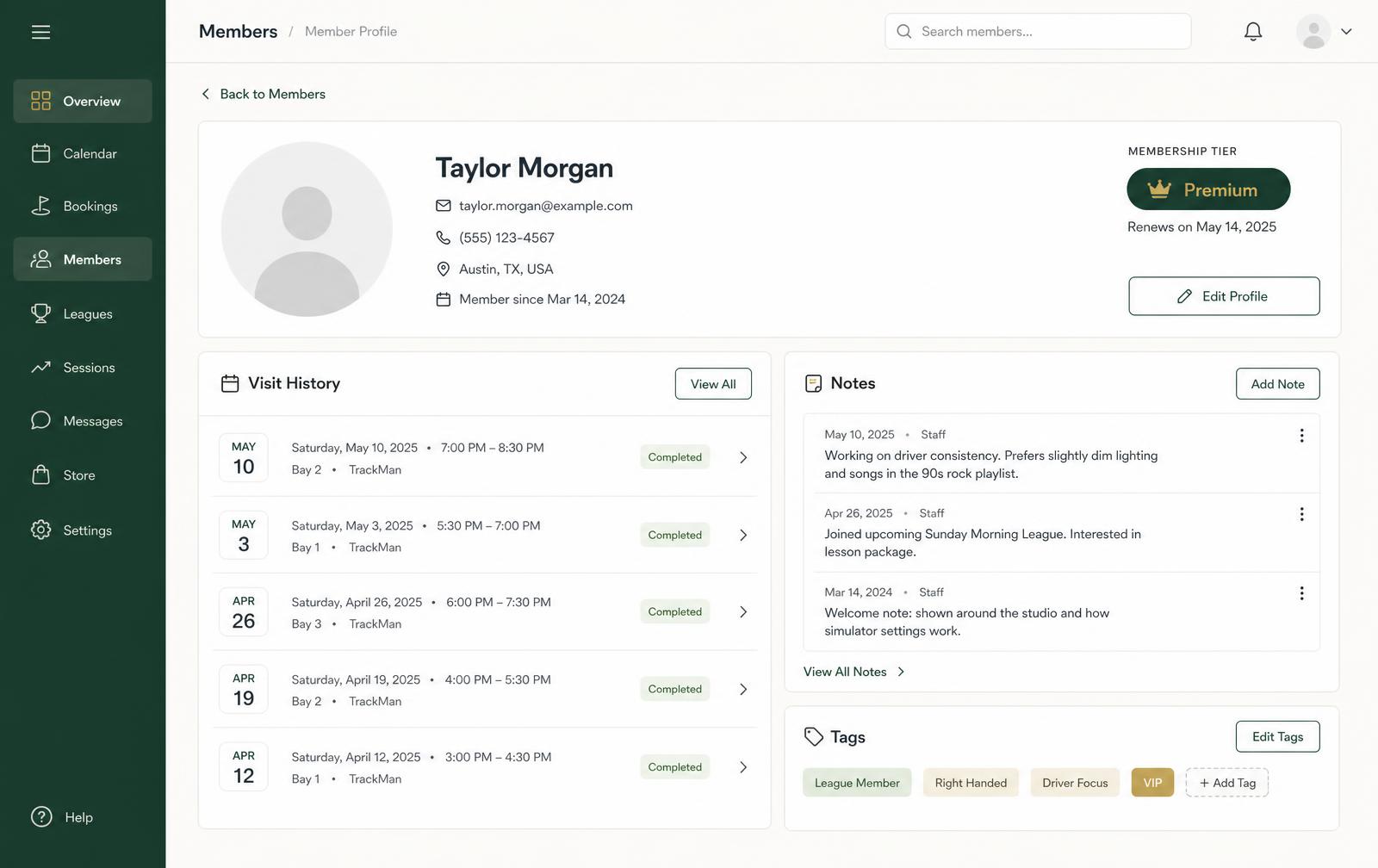
Member management
Member management screen listing indoor golf studio members with membership tier, visit history and account status.

Deeper detail on two of these: golf simulator booking software and indoor golf membership software.

Day to day

What each role actually does with it

Software succeeds or fails at the front desk. Here's the honest division of labour.

Owner

Runs the business from evidence rather than impressions, and spends less time assembling numbers.

  • Utilisation by bay and hour before changing pricing or hours
  • Recurring revenue and expiring memberships at a glance
  • Retention trend alongside revenue trend
  • One monthly review instead of stitching exports together

Front desk

Lives in the tee sheet. Every routine action should be two clicks and no second system.

  • Book, move, extend or cancel from one view
  • See membership credits and payment state on the booking
  • Add notes that the next shift will actually read
  • Reminders and confirmations send without being remembered

Member

Self-serves the things that otherwise interrupt your staff.

  • Book available bay time from a phone
  • See upcoming sessions and membership balance
  • Get confirmations, reminders and league details automatically
  • Renew without a phone call

Low-risk adoption

Roll out alongside the systems you already run

You should not have to bet a month of trading on a cut-over weekend. Each stage below stands on its own, and nothing configured early gets rebuilt later.

  1. Stage 1

    1.Connect

    Member and visit information comes into one place while your current booking and payment tools keep running exactly as they do today.

    • No front-desk workflow change
    • Baseline utilisation and revenue visibility
  2. Stage 2

    2.Engage

    Turn on confirmations, reminders, renewal notices and first-visit follow-up. Low risk, and usually where behaviour changes first.

    • Templates you approve
    • Send history on the member record
  3. Stage 3

    3.Operate

    Move scheduling onto the visual tee sheet and memberships and billing onto the member record — after the data is already trusted.

    • Short parallel-run window
    • Front-desk training before cutover
  4. Stage 4

    4.Optimise

    Use your own utilisation, revenue and retention data to revisit pricing, opening hours, league scheduling and staffing.

    • Monthly review habit
    • Decisions traceable to your numbers

Comparison

Generic scheduler, point tools, or a connected platform

A capability comparison by category of software — not by named competitor. Use it to work out which category you're actually shopping in.

Capability comparison across categories of software used by indoor golf studios.
CapabilityGeneric schedulerDisconnected point toolsPerfect Swing Studio
Bay-aware schedulingCalendar slots; bays modelled as staff or roomsPresent in the booking tool onlyVisual tee sheet built around your bay inventory and hours
Single member recordContact details attached to a bookingDuplicated across tools and drifting apartOne profile carrying visits, tier, credits, invoices and messages
Memberships and creditsRarely supportedUsually a spreadsheet in practiceTiers, credits, renewals and expiry visibility on the record
Lifecycle communicationBooking confirmation onlySeparate email or SMS tool with no visit contextTemplated confirmations, reminders, renewals and win-back
ReportingBookings counted; little utilisation insightManual exports stitched togetherUtilisation by bay and hour, revenue trend, retention
Member self-serviceBasic online bookingInconsistent between toolsPortal with sessions, balance and self-service booking
Adoption pathCheap to start, low ceilingLow per tool, high total overheadStaged rollout alongside your current systems

Implementation

The implementation questions worth settling first

Ask us these in the demo. We'd rather answer them plainly than have you discover the answer in month three.

Can we keep our current booking and payment systems at first?
Yes — that's the design intent. Stage 1 and 2 above deliver value without touching your existing scheduling or payments.
What gets configured during onboarding?
Bays, opening hours, session lengths, pricing and membership tiers, done together with you rather than handed over as a setup task.
What member and booking data can come across?
This depends on what your current system exports. We review your actual export during onboarding and tell you specifically what can and cannot be brought over.
Which integrations are confirmed for our setup?
Payments, launch monitors and accounting are reviewed against your specific tools during onboarding. We don't describe an integration as live for your studio until it's confirmed.
How many bays and locations does it handle?
The tee sheet is built for multi-bay studios from one bay upward. Multi-location structures differ enough that we review yours before confirming fit.
Who trains the front desk, and when?
We train your staff before you go live on any stage that changes their workflow — never on the day of a busy weekend.

Being straight about scope: Perfect Swing Studio can begin alongside your current booking and payment systems, and we do not claim any specific third-party integration is live for your studio until it has been confirmed during onboarding. If full consolidation is what you need on day one, tell us in the demo and we'll be honest about fit.

Straight answers

Frequently asked questions

What we can confirm today, and what we review together during onboarding.

Do I have to replace my current booking system to get started?

No. Perfect Swing Studio is designed to run alongside the booking and payment tools you already use. Most studios begin with member profiles, communication and reporting, then decide later whether to move scheduling and billing across.

What does golf simulator management software actually cover?

In our case: a visual tee sheet across your bays, booking records with status and notes, member profiles with visit history, membership tiers and renewals, invoices tied to the member record, automated member communication, and utilisation and revenue reporting.

How many bays and locations does it handle?

The tee sheet is built around multi-bay studios, from a single bay to a larger floor. Multi-location operators are part of who we build for, but because shared memberships, pricing and staffing differ per operator, we review your structure during the demo before confirming fit.

Which integrations are confirmed?

Integration availability — payments, launch monitors, accounting — is reviewed during onboarding based on your current setup. We do not claim an integration is live for your studio until it is confirmed.

What does onboarding involve?

Onboarding is hands-on. We configure bays, hours, pricing and membership tiers with you, help bring across existing member and booking information where that is possible, and train your front desk before you go live.

Private demo

See Perfect Swing Studio in Action

Tell us about your studio and we'll walk through your real operating model — bay count, memberships, and the systems you already run.

Software, spreadsheets, or nothing yet.