Memberships and retention

Indoor Golf Membership Software for Studios That Live on Recurring Revenue

Memberships are the difference between a busy month and a predictable business. Perfect Swing Studio keeps tiers, credits, renewals and visit history on one member profile — so retention becomes something you manage rather than discover.

Start with member records, engagement and retention insight while your current booking and payment tools keep running.

Member profile
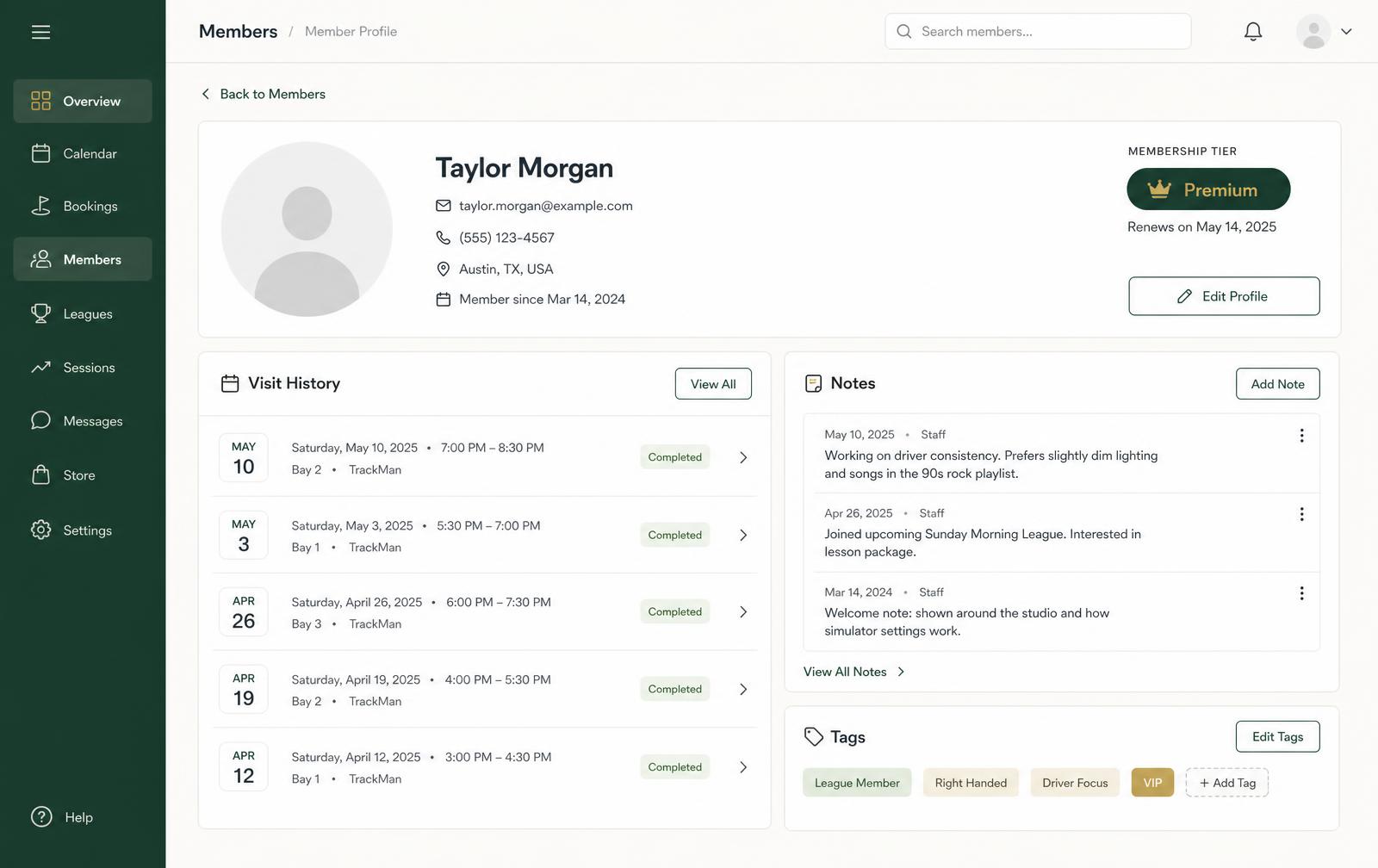
Member profile page for an indoor golf studio showing membership tier, renewal date, visit history by bay, staff notes and member tags.

What it does

One profile per member, and everything hangs off it

Membership software fails when the data lives in three places. Here, tier, credits, visits, notes and messages sit on the same record.

Member profiles your front desk trusts

Visit history, membership tier, staff notes and tags on one screen — the difference between processing a transaction and greeting someone who feels recognised.

  • Visit history by date, bay and session length
  • Staff notes and tags for coaching, leagues or preferences
  • Membership status visible during check-in

Tiers, credits and included time

Define the tiers your studio actually sells, attach included hours or credits, and let sessions draw against the balance instead of a spreadsheet.

  • Multiple tiers with their own price and inclusions
  • Included time or credit balances on the member record
  • Session usage reflected against the membership

Renewals and lapse prevention

Renewal dates and status are visible before they bite, and renewal communications can send automatically so a lapsed card doesn't quietly become a lost member.

  • Renewal dates surfaced on the profile
  • Automated renewal and win-back messaging
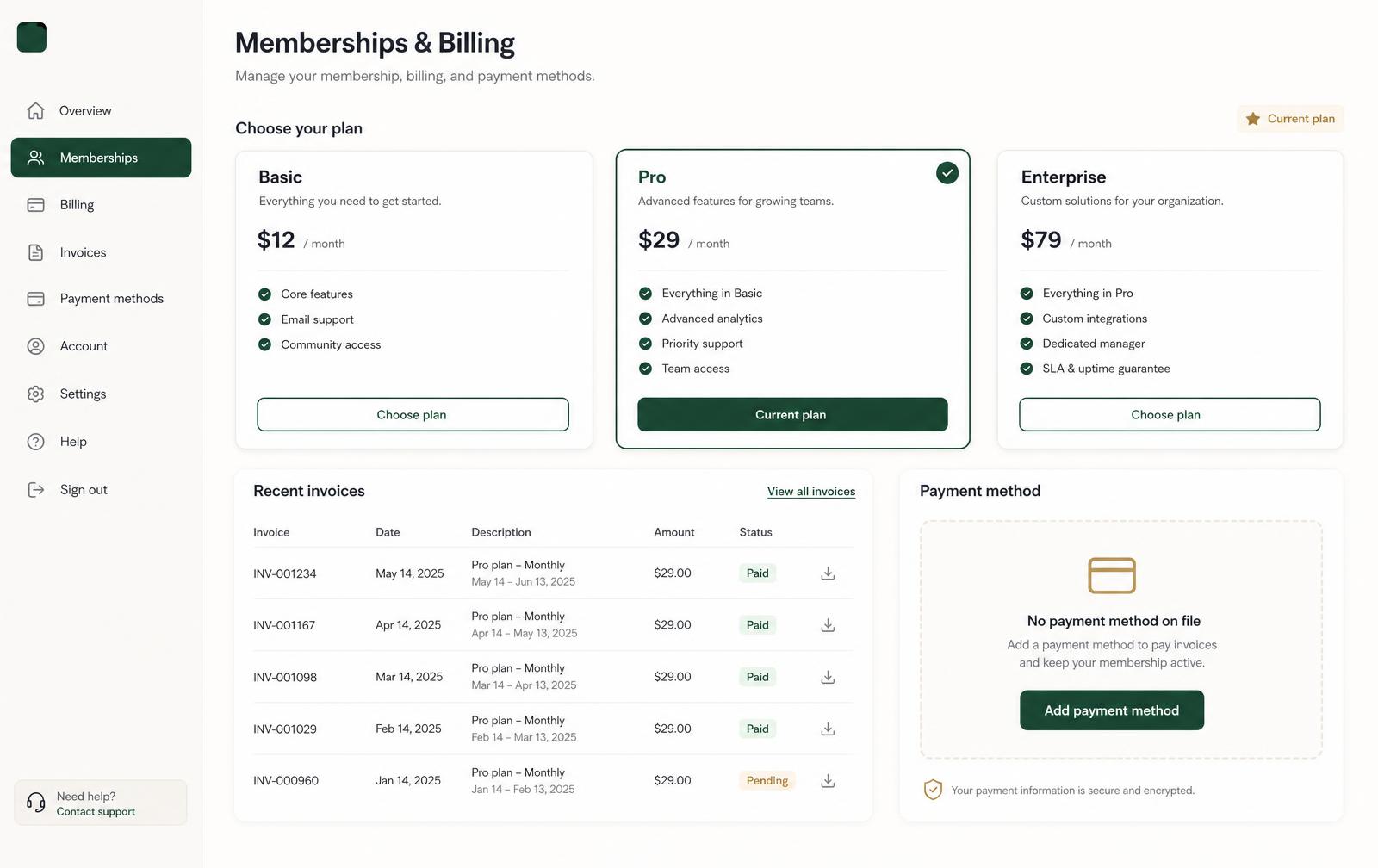
  • Invoice and payment state tied to the member

Retention, referrals and recurring revenue visibility

See which tiers hold, where visits fade and which members bring others in — then act on it with targeted communication instead of a blanket blast.

  • Retention curves by membership tier
  • Visit-frequency signals for at-risk members
  • Referral and word-of-mouth tracking on the profile

Recurring revenue you can see, not reconstruct

Tiers, invoices and payment status stay tied to the member record, so the monthly question — who renewed, who lapsed, what is actually recurring — is answered on screen rather than rebuilt in a spreadsheet at the end of the month.

Memberships & billing
Memberships and billing screen showing membership plan tiers, recent invoices with paid and pending status, and a payment method panel.

Honest framing: membership records, engagement and retention insight can begin alongside the payment and booking tools you run today. Any specific payment-provider or accounting integration is confirmed for your studio during onboarding, not assumed here.

Straight answers

Frequently asked questions

What we can confirm today, and what we review together during onboarding.

Can I run more than one membership tier?

Yes. You define tiers with their own price, included time or credits and renewal cadence, and each member profile shows the tier they hold alongside their visit history.

How are included credits or hours tracked?

Included time and credits attach to the membership, and sessions draw against the member record so both your team and the member can see what remains without a manual tally.

What happens as renewals approach?

Renewal dates sit on the member profile and renewal communications can send automatically, so lapses are caught before the payment date rather than a month afterwards.

How does it help retention?

Visit history, membership status and lapse signals live in one place, and follow-up communication can be triggered for members whose visits drop off. The software surfaces the risk and sends the message; the relationship is still yours.

Do I need to move billing across to use memberships?

You can start with membership records, communication and retention insight while your current payment tool keeps charging, then move invoicing onto the member record later. Payment-provider specifics are confirmed during onboarding.
Private demo

See Perfect Swing Studio in Action

Tell us about your studio and we'll walk through your real operating model — bay count, memberships, and the systems you already run.

Software, spreadsheets, or nothing yet.