Growth and engagement

Golf Simulator Marketing Software That Grows Repeat Visits

Capture every enquiry, follow up automatically, fill quiet hours with events and leagues, and keep the members you already have coming back — using the visit data your studio produces every day.

This is the layer studios switch on first, because it works alongside your current booking and payment systems from day one.

Communications
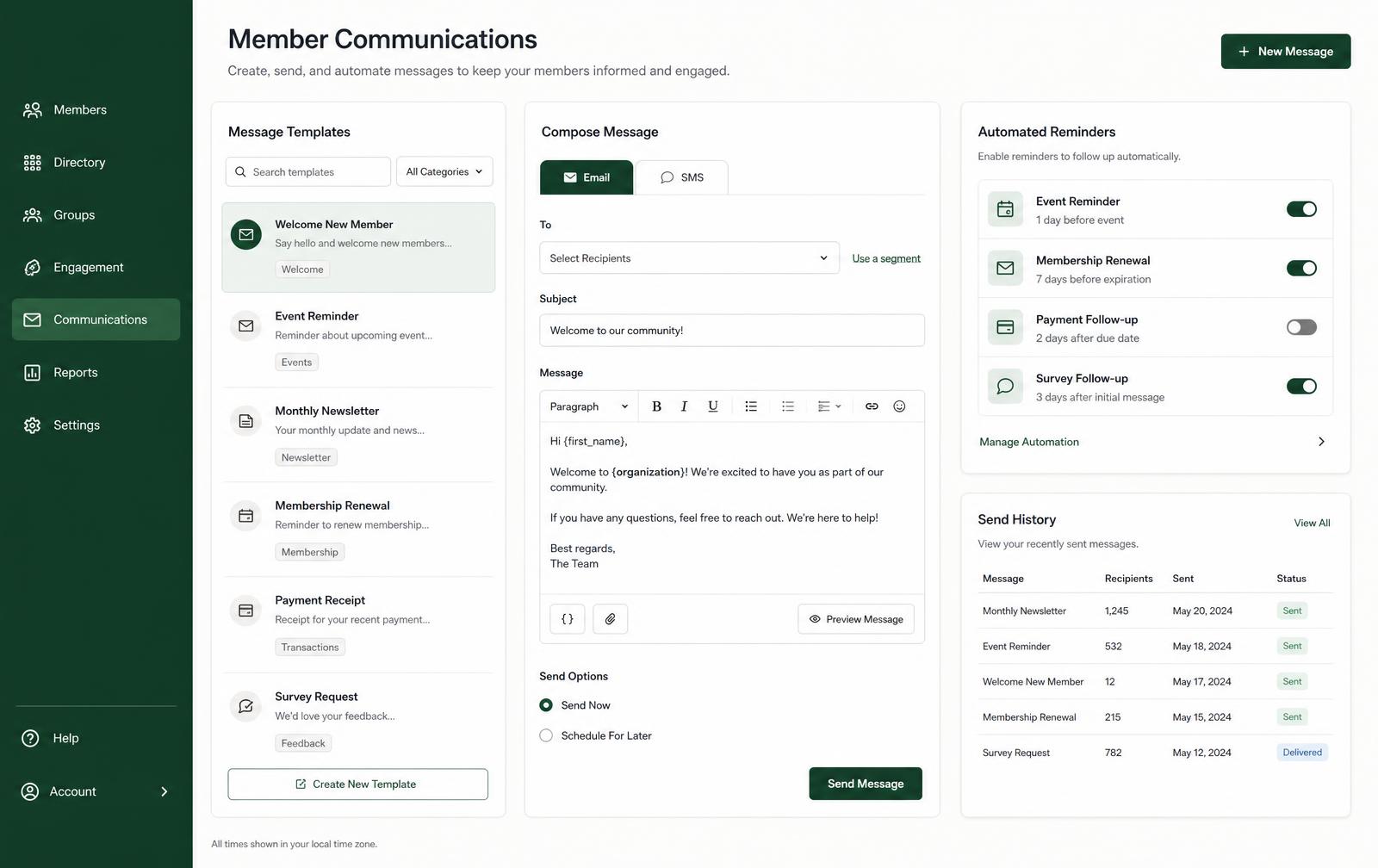
Member communications screen with message templates, an email and SMS composer, automated reminder toggles and send history.

What it does

Growth work that runs without a marketing hire

The front desk cannot chase every lapsed member by hand. These are the sequences that keep running when the studio is busy.

Lead capture and automated follow-up

Enquiries and first-time visitors become records with a follow-up sequence attached, so interest doesn't evaporate between a Saturday visit and the next free evening.

  • Enquiries and walk-ins captured as member records
  • Automated first-visit follow-up from your templates
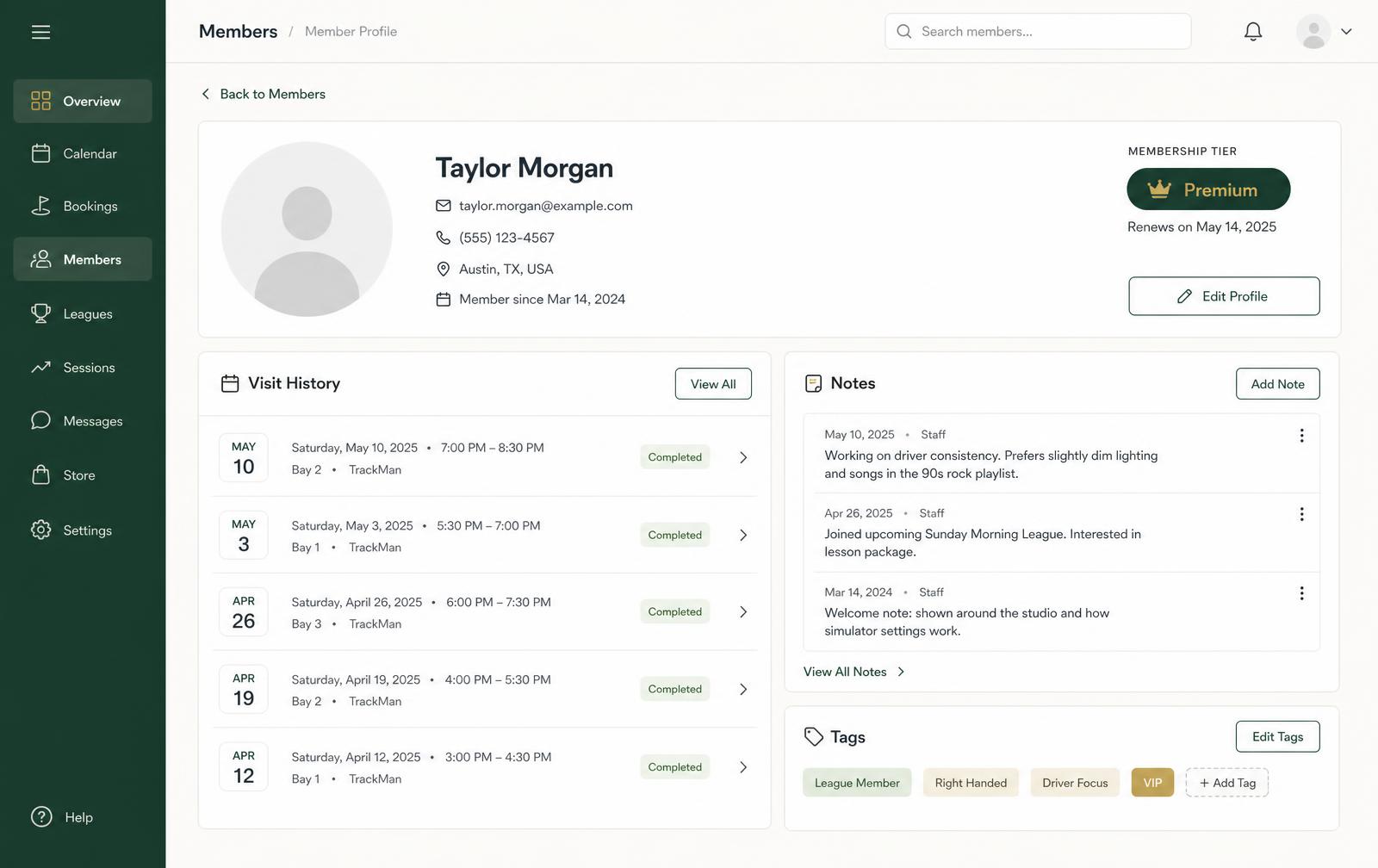
  • Send history visible on the member profile

Member engagement and win-back

Visit history shows who is drifting. Targeted communication reaches those members specifically, instead of a blanket message that trains everyone to ignore you.

  • Visit-frequency signals for at-risk members
  • Win-back messaging for lapsed golfers
  • Renewal reminders before a membership expires

Events, leagues and quiet-hour demand

Weekday evenings are where simulator studios have the most unsold inventory. Promote leagues, clinics and social nights to the members most likely to book them.

  • League and event promotion to targeted segments
  • Recurring league scheduling on the tee sheet
  • Quiet-hour utilisation tracked over time

Referrals and utilisation insight

Word of mouth is the strongest channel a studio has. Track who brings guests in, and use utilisation and retention reporting to see which campaigns actually moved bay-hours.

  • Referral and guest activity on the member record
  • Utilisation by hour to judge campaign impact
  • Retention views alongside revenue trend

The member experience is part of the marketing

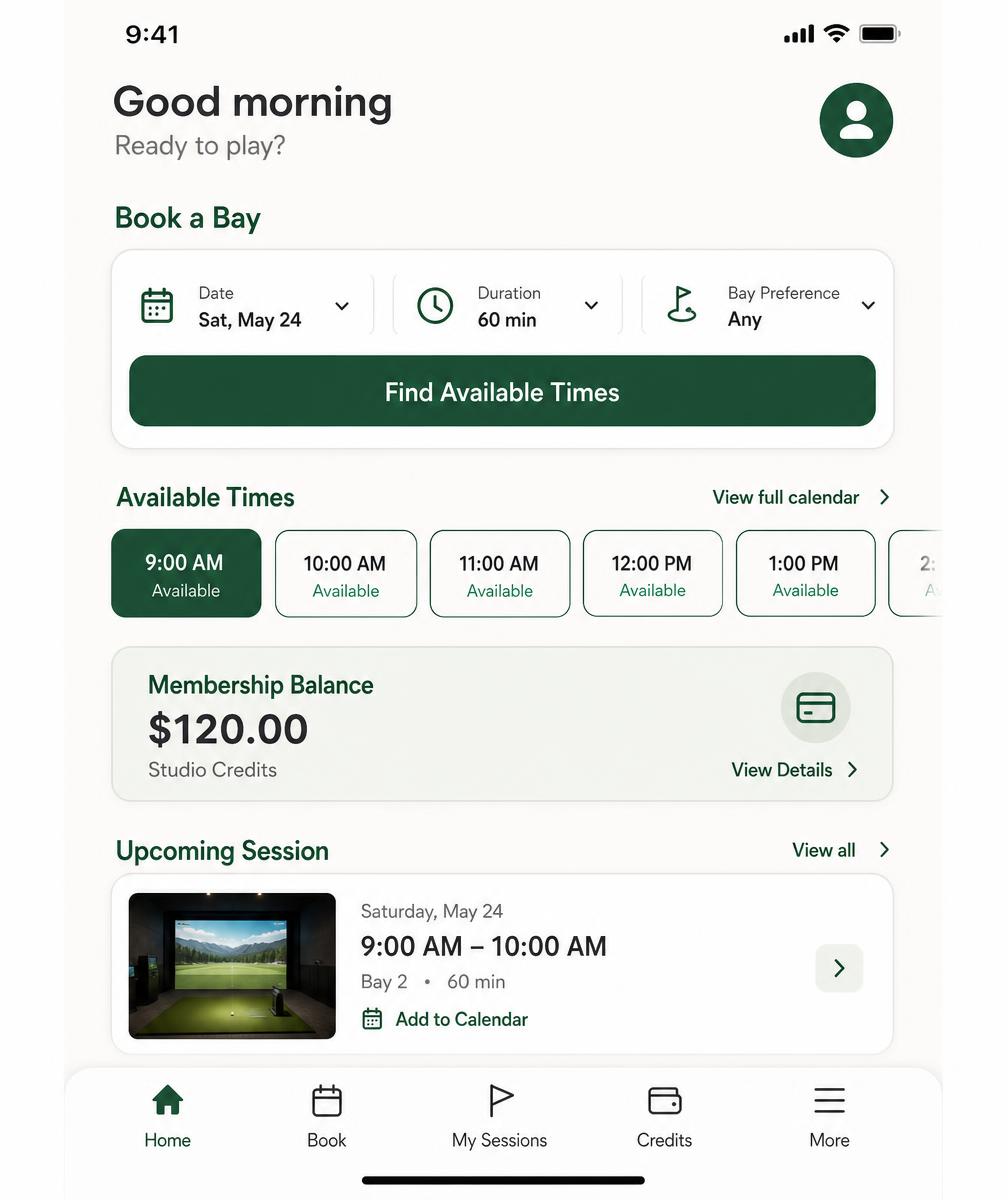
A member who can see their upcoming sessions, membership balance and next league night on their phone books again without being sold to. Convenience is retention, and retention is the cheapest growth a studio has.

Member portal
Mobile member portal for an indoor golf studio showing upcoming simulator sessions, membership balance and a booking screen.

The value story

Attract → Convert → Engage → Retain → Reactivate

Marketing for a simulator studio is not a campaign; it's a lifecycle. Each stage below has its own workflow, and the later stages are consistently the cheapest revenue in the building.

  1. Attract

    1.Turn local interest into captured enquiries

    Demand for indoor golf is local and intent-driven. The job is to be findable and then to make sure nothing that arrives gets lost.

    • Enquiries and walk-ins captured as member records
    • Source and campaign context stored with the enquiry
    • One place to see what's actually coming in
  2. Convert

    2.Make the second visit happen

    A first-time visitor is the warmest audience you'll ever have, and the window is short. Automated follow-up does what a busy front desk cannot.

    • Same-day thank-you and orientation message
    • Follow-up suggesting specific available times
    • Membership case introduced only after repeat usage
  3. Engage

    3.Fill quiet bay hours with the right segments

    Unsold hours are perishable. Target them with offers aimed at the members whose history suggests they'd actually come, rather than discounting everything.

    • Segment by visit pattern and preferred hours
    • League, event and clinic promotion
    • Quiet-hour utilisation tracked over time
  4. Retain

    4.Strengthen memberships before renewal dates

    Members leave gradually, not suddenly. Under-utilisation and lengthening visit gaps are visible weeks before a renewal fails.

    • Pre-expiry renewal reminders
    • Under-utilisation flagged early
    • Welcome sequence protecting the first month
  5. Reactivate

    5.Work the warm list most studios never touch

    Former pay-as-you-go visitors and expired members already know where you are. Contact them specifically and seasonally, not constantly.

    • At-risk and lapsed segments built from visit history
    • Win-back messaging referencing what they actually play
    • Outcomes logged on the member record
  6. Compound

    6.Referrals and word of mouth

    The strongest channel a studio has. Track guest activity and give existing members a structured reason to bring someone.

    • Guest and referral activity on the member record
    • Targeted referral prompts to engaged members
    • Guest-to-member follow-up sequence

Want the executable version of this? The 90-day golf simulator marketing playbook turns each stage into a week-by-week plan you can run yourself.

Practical workflows

The sequences that keep running when the studio is full

Every one of these is something operators intend to do manually and stop doing by the second busy weekend.

Enquiry capture and routing

Every enquiry becomes a record with a follow-up attached, so a Saturday walk-in still hears from you on Tuesday.

First-visit follow-up

A short automated sequence that answers newcomer questions and offers concrete times for a second booking.

Quiet-hour campaigns

Segment by visit history and preferred times, then promote your weakest recoverable block to the right people.

League and event promotion

Recurring bay blocks on the tee sheet plus targeted invitations to members who already play that night.

Membership conversion prompts

Repeat pay-as-you-go usage flags the moment to make the tier case from the golfer's own spend.

Renewal and win-back

Pre-expiry reminders, at-risk lists built from visit-frequency change, and seasonal reactivation of lapsed golfers.

Segmentation

Build audiences from tier, visit frequency, preferred hours and lapse status instead of blasting one list.

Engagement tracking

Send history on the member profile and utilisation views so you can see what moved bay-hours.

Member segments
Member list for an indoor golf studio segmented by membership tier, visit frequency and account status for targeted marketing.
Engagement analytics
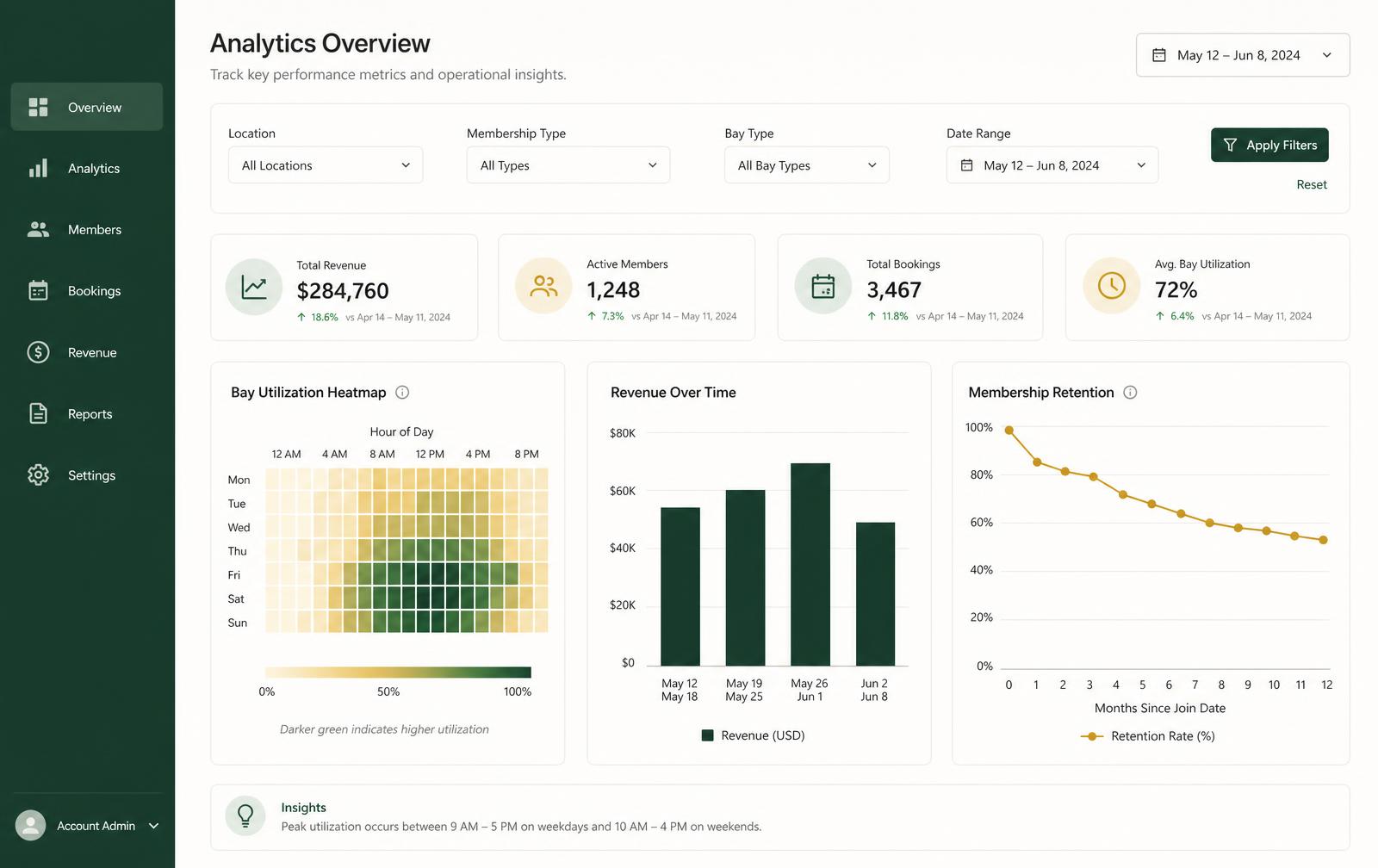
Analytics view showing bay utilisation by hour, revenue trend and membership retention used to judge marketing impact.

Measurement

Metrics to monitor — not results we're claiming

We publish no benchmark figures, because your market, pricing and bay count decide the numbers. These are the metrics worth watching against your own baseline.

Bay utilisation by hour and by day
Your core inventory metric. Watch it as a grid so quiet-hour campaigns can be judged where they were aimed.
First-visit return rate within 30 and 60 days
The clearest single test of whether your follow-up sequence is working.
Visits per active member per month
Engagement depth. Falling frequency predicts churn earlier than cancellations.
Pay-as-you-go to membership conversion rate
How well usage-triggered membership offers are landing.
Renewal and churn rate by tier
Shows which tier is actually earning its place, and where renewal effort should go.
Lapsed-member reactivation rate
How much of your warm list you recover per campaign window.
League and event fill rate
Seats or teams against capacity, plus whether participants book outside league night.
Recurring versus transactional revenue mix
The stability metric — a rising recurring share makes quiet months survivable.
Adoption

Start here, expand later

Engagement and marketing is the layer most studios switch on first, precisely because it needs no migration to be useful.

What you can run in weeks

  • Enquiry capture with automatic follow-up
  • First-visit and win-back sequences from your templates
  • Segmented quiet-hour and league promotion
  • Renewal reminders before memberships expire
  • Engagement history on every member profile

What can follow when you're ready

  • Scheduling on the visual tee sheet
  • Memberships, credits and invoices on the member record
  • Full utilisation, revenue and retention reporting
  • A member portal for self-service booking

That larger scope lives on golf simulator management software, and membership mechanics on indoor golf membership software.

Straightforward about scope: engagement and marketing can start alongside your existing booking and payment systems, and we make no claim about a confirmed integration with a specific email, SMS or booking provider until it has been reviewed for your studio during onboarding.

Straight answers

Frequently asked questions

What we can confirm today, and what we review together during onboarding.

What does marketing software do for an indoor golf studio?

Most simulator studios lose more revenue to golfers who visited once than to golfers who never heard of them. The marketing side captures enquiries, follows up automatically, promotes events and leagues into quiet hours, and keeps existing members engaged.

How are leads captured and followed up?

Enquiries and first-time visitors become member records, and follow-up sequences send automatically from your templates — so a Saturday walk-in still hears from you on Tuesday without anyone remembering to send it.

Can I promote leagues and events?

Yes. Events and league nights are a practical way to fill weekday evenings, and you can target the communication to the members whose visit history suggests they'd come.

Does it replace my email or SMS provider?

Member communication runs from templates inside the platform, with send history attached to the member record. Which channels and providers apply to your studio is confirmed during onboarding.

Do I need to switch booking systems first?

No. Marketing and engagement is usually the first thing studios turn on, precisely because it works alongside the booking and payment tools already in place.

Private demo

See Perfect Swing Studio in Action

Tell us about your studio and we'll walk through your real operating model — bay count, memberships, and the systems you already run.

Software, spreadsheets, or nothing yet.